
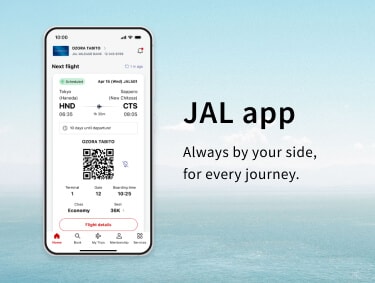
After 17:00 (JST) on Wednesday, April 15, 2026, the new JAL app will be available by updating to version v6.0.0 via the iOS or Android app stores. (Please note that there may be a delay before the update appears in the store depending on your device.)
Currently, there are some glitches in our system. For more information, please check the details below.
A streamlined and simple design, crafted for everyone to understand. Smooth and effortless usability.
Stress-free experience for first time and frequent travelers alike.
What you need, when you need it, the new JAL app has taken off.
With the JAL app, your next trip is just a few taps away. Where will you soar to next?
From discovering travel inspiration and exploring your destination to booking your flights and securing your seat, the JAL app handles it all.
Check inflight menus, meal service timings, and Wi-Fi availability in advance.
Visualize your time on board to better enjoy the skies.
Everything you need for boarding is available at a glance, including real-time push notifications for gate changes or delays.
The app guides you through every step, so you’re always in the know.
Connecting to inflight Wi-Fi is easier than ever with the JAL app.
Easily track your Miles, Life Status Points, and the journey to your next tier.
We recommend to update your app to the latest version for a seamless experience.
For customers experiencing technical issues, please refer to the "Recommended Action" in the table below until the service is fully restored.
We appreciate your patience and cooperation.
Affected Customers
Customers who have 10 or more flight records (including flights flown within the past 2 days).
Recommended Action
Please check your booking details via the "Manage Booking" section on the JAL website.
Affected Customers
Customers who traveled on flights that experienced delays of 30 minutes or more, or flights operated under special conditions.
Recommended Action
Due to current app specifications, flights may remain on the Home screen for approximately two days after arrival.
When boarding your next flight, please manually select the correct flight from the Home screen or "My Trips" list.
Affected Customers
Customers searching for paid tickets on domestic flights.
Recommended Action
Until this issue is resolved, please tap "Confirm" each time the pop-up appears to proceed with your search.
Affected Customers
Customers with reservations for flights operated by other airlines (flight numbers starting with an airline code other than "JL"), where the ticket was purchased through an entity other than JAL.
Recommended Action
Please verify your actual seat assignment status through the original point of purchase or the "Manage Booking" section on the JAL website.